基本的なphp-diの使い方
マニュアル: http://php-di.org/doc/getting-started.html
インストール
現時点ではversion6がインストールされる
composer require php-di/php-di
DI対象のクラスの例
HogeクラスはFugaクラスを引数に取るように定義
class Fuga
{
    public function hello()
    {
        echo "FUGA\n";
    }
}

class Hoge
{
    protected $fuga;

    public function __construct(Fuga $fuga)
    {
        $this->fuga = $fuga;
    }

    public function hello()
    {
        echo "HOGE\n";
        $this->fuga->hello();
    }
}
PHPによるコンテナ定義
ドキュメント: http://php-di.org/doc/php-definitions.html
コンテナ定義の基本形
// test.php
require_once __DIR__.'/vendor/autoload.php';

use Psr\Container\ContainerInterface;

$container = new DI\Container();
$builder = new DI\ContainerBuilder();
$builder->addDefinitions([
    Hoge::class => function (ContainerInterface $c) {
        return new Hoge($c->get(Fuga::class));
    },
    Fuga::class => function (ContainerInterface $c) {
        return new Fuga();
    },
]);
$container = $builder->build();
$container->get(Hoge::class)->hello();
実行すると
% php test.php
HOGE
FUGA
%
コンテナ値の定義(addDefinitions)は様々な書き方が可能
// クロージャの引数をコンテナにしない事も可能
    Hoge::class => function (Fuga $fuga) {
        return new Hoge($fuga);
    },
// DIクラスのメソッド記法
    Hoge::class => DI\create(Hoge::class)->constructor(DI\get(Fuga::class)),
// createメソッドは引数と対象のクラスが同じなら省略も可能
    Fuga::class => DI\create(),
// createの代わりにautowireを使うと自動でconstructorの依存関係も解釈してインジェクションを行う
    Hoge::class => DI\autowire(),
build後もcontainerにsetする事も可能(が、build後に設定する事になるのでキャッシュ機能を使うとエラーになる)
$builder->addDefinitions([
    Hoge::class => DI\autowire(),
]);
$container = $builder->build();
$container->set(Fuga::class, DI\create());
パラメータ名とクラス名が一致してる場合、addDefinitionsによる定義を省略しても自動で読み込まれる(Autowiring機能)
$builder = new ContainerBuilder();
$container = $builder->build();
$container->get(Fuga::class)->hello();
アノテーションによるコンテナ定義
ドキュメント: http://php-di.org/doc/annotations.html
doctrine/annotationsが必要となるのでインストール
composer require doctrine/annotations
アノテーションはbuildする前に明示的に「$containerBuilder->useAnnotations(true);」する必要がある
$container = new DI\Container();
$builder = new DI\ContainerBuilder();
$builder->useAnnotations(true);
$container = $builder->build();
$container->get(Hoge::class)->hello();
そしてアノテーションでクラスにインジェクションが行えるようになる
class Hoge
{
    /**
     * @Inject
     * @var Fuga
     */
    private $fuga1;
    private $fuga2;

    /**
     * @Inject
     * @param Fuga $fuga
     */
    public function __construct($fuga)
    {
        $this->fuga2 = $fuga;
    }

    public function hello()
    {
        echo "HOGE\n";
        $this->fuga1->hello();
        $this->fuga2->hello();
    }
}
実行すると
% php test.php
HOGE
FUGA
FUGA
%
キャッシュの設定
キャッシュを指定する事も可能なので本番環境では設定すると良い
$builder = new \DI\ContainerBuilder();
$builder->enableCompilation(__DIR__ . '/tmp');
$builder->writeProxiesToFile(true, __DIR__ . '/tmp/proxies');
$container = $builder->build();
pimpleコンテナとの並行利用
元々pimpleのコンテナを利用しており、いきなりphp-diに切り替えるのはちょっと怖いなという場合はpimpleコンテナとphp-diコンテナを1つのコンテナにまとめることが可能
まずはライブラリをインストール
composer require pimple/pimple
composer require acclimate/container
複数コンテナを一つのコンテナとして扱えるようにできる。このようにすると内部的に徐々にコンテナ定義を移行できる
// test.php
require_once __DIR__.'/vendor/autoload.php';

use Pimple\Container as PimpleContainer;
use DI\ContainerBuilder;
use Acclimate\Container\ContainerAcclimator;
use Acclimate\Container\CompositeContainer;

# pimpleで定義
$pimpleContainer = new PimpleContainer();
$pimpleContainer['bar'] = function ($c) {
    return new Bar();
};
# PHP-DIで定義
$builder = new ContainerBuilder();
$phpdiContainer = $builder->build();

$acclimator = new ContainerAcclimator;
$pimpleContainer = $acclimator->acclimate($pimpleContainer);
$phpdiContainer = $acclimator->acclimate($phpdiContainer);

$container = new CompositeContainer([$pimpleContainer, $phpdiContainer]);


$container->get(Hoge::class)->hello();
$container->get('bar')->hello();

class Fuga
{
    public function hello()
    {
        echo "FUGA\n";
    }
}

class Hoge
{
    protected $fuga;

    public function __construct(Fuga $fuga)
    {
        $this->fuga = $fuga;
    }

    public function hello()
    {
        echo "HOGE\n";
        $this->fuga->hello();
    }
}

class Bar
{
    public function hello()
    {
        echo "BAR\n";
    }
}
実行
% php test.php
HOGE
FUGA
BAR
%
Slim3からSlim4へのバージョンアップの際のメモ
現在担当している会社のシステムはPHPをSlimを利用している。そのシステムをSlim3からSlim4にバージョンアップした際に調べた事などを折角なのでブログに残しておく
ドキュメント
下記は一通り目を通した
slim4のドキュメント
Slim 4 Documentation - Slim Framework
Upgrade Guide - Slim Framework
3系からの変更点
Slim 4.0.0 released - Slim Framework
slim4チートシート
Slim 4 - Cheatsheet and FAQ | Daniel Opitz
3系から4系への変更点
index.phpの書き方
Slim4のスケルトンが公開されているのでこれを参考にすると良い
Slim-Skeleton/index.php at master · slimphp/Slim-Skeleton · GitHub
コンテナ
- 標準のDIコンテナがpimpleからphp-diに変更
- 元々pimpleを継承したSlimのライブラリを使用していたが、それが削除されてphp-diライブラリを使用するようになった
- http://php-di.org/
ルーティング
Slim3
$container->router->pathFor('xxx')

Slim4
$app = AppFactory::create();
$routeParser = $app->getRouteCollector()->getRouteParser();
$routeParser->urlFor('xxx');
- ルートの取得方法がRouteCollector経由での取得に変わった
- ルートオブジェクトの名前が「Slim\Route」から「Slim\Routing\Route」に変更
- 微妙にgroupの指定の仕方が変わった
# Slim3
$app->group('/test', function () {
    $this->map(['GET'], '/hoge', App\HomeController::class . ':index')->setName('home');
});

# Slim4
$app->group('/test', function (RouteCollectorProxyInterface $group) {
    $group->map(['GET'], '/hoge', App\HomeController::class . ':index')->setName('home');
});
エラーハンドラ
ミドルウェア
ミドルウェの実装の仕方が変わった
# Slim3
public function __invoke(ServerRequestInterface $request, ResponseInterface $response, callable $next)
{
    return $next($request, $response);
}

# Slim4
public function __invoke(Request $request, RequestHandler $handler): Response
{
    return $handler->handle($request);
}
twig
- 連携方法が連携ライブラリ + ミドルウェアに変更された
php - how to add twig-view in slimframework v4 - Stack Overflow
- twig連携ライブラリは3.xブランチを使用すると良いがTwigのバージョンをあげる必要が出てくる
GitHub - slimphp/Twig-View at 3.x
- マクロ名の変更
- https://github.com/slimphp/Twig-View/tree/3.x#custom-template-functions
- path_for -> url_for
Request/Response
- オブジェクトの変更
- Slim\Http\Request -> Slim\Psr7\Request
- Slim\Http\Response -> Slim\Psr7\Response
- isPost, isGetメソッドの廃止
# Slim3
if ($request->isPost()) {
    xxxx
}

# Slim4
if (strtoupper($request->getMethod()) === 'POST') {
    xxx
}
- withRedirectメソッドの廃止
# Slim4での書き方
return $response->withHeader('Location', $url)->withStatus(302);
- withJsonメソッドの廃止
# Slim4での書き方
$response->getBody()->write(json_encode($data));
return $response->withHeader('Content-Type', 'application/json');
- writeメソッドの呼び出し方法の変更
# Slim3
return $response->withHeader('Content-Type', 'application/octet-stream')->write($data)

# Slim4
$response->getBody()->write($data);
return $response->withHeader('Content-Type', 'application/octet-stream')
# Slim3
$data = $request->getParsedBody();

# Slim4
$data = json_decode($request->getBody(), true);
標準middlewareで対応する方法もある https://akrabat.com/receiving-input-into-a-slim-4-application/
例外
- slimの例外の名称変更
- NotFoundException -> HttpNotFoundException
- 引数の変更
# Slim3
throw new NotFoundException($request, $response);

# Slim4
throw new HttpNotFoundException($request);
PHPでMonologを利用してRollbarにメッセージを送信
Monologを利用してRollbarにメッセージを送信する方法です
ちなみにRollbarとはエラーをモニタリングしてくれるサービスです。(NewRericと類似サービス)
まずはcomposerを使用してrollbarのクライアントをインストールします。
./composer.json
    "require": {
~略~
        "rollbar/rollbar": "~1.1"
},rollbarにアカウントを作成して、access_tokenを取得した上で、以下のように設定するとメッセージをRollbarに送信する事ができるようになります。
<?php
use Rollbar\Rollbar;
use Rollbar\Payload\Level;

Rollbar::init([
    'access_token' => 'xxxxxx',
    'environment' => 'dev',
]);
Rollbar::log(Level::info(), 'testing info level');
try {
    throw new \Exception('test exception');
} catch (\Exception $e) {
    Rollbar::log(Level::error(), $e);
}
次はMonologを利用しようとしてHandlerの一覧を眺めていた所、RollbarHandlerというHandlerが存在したので、これを利用すればすぐ実装できると考えました。
monolog/RollbarHandler.php at master · Seldaek/monolog · GitHub
しかし、RollbarHandlerを参照するとコンストラクタにRollbarNotifierが必要とされます。
RollbarNotifierとは何ぞや・・・とソースをgrepしてもどこにもそんなクラスは存在しません。
更に調べてみると、どうやら古いバージョンのRollbarクライアントには存在したけどここ最近のバージョンからは削除されているようです。
という事でissueに書いてある通り、RollbarLoggerを使う事にします。
use Rollbar\Rollbar;
use Monolog\Logger;

Rollbar::init([
    'access_token' => 'xxx',
    'environment' => 'dev',
]);
$logger = new Logger('test!');
$psrHandler = new \Monolog\Handler\PsrHandler(Rollbar::logger());
$logger->pushHandler($psrHandler);

$logger->info('test info');
$logger->error('test error');
$logger->crit('test crit');
これでMonologを利用してRollbarにメッセージを送信できるようになりました。
ちなみにalertとnoticeはRollbarにレベルとして存在しないのでエラーとなりますのでご注意です。
PHPでSQSのFIFOキューを使った時のメモ
SQSのFIFOキューを使用する時に調べた事を記述します。
みんな大好きSQSは昔から存在する手軽に利用できるキューシステムですが、メッセージの順序保障と二重送信などはアプリ側で考慮する必要がありました。
しかし何時の間にやらFIFOキューとして機能が強化されていましたので調べてみた次第です
Amazon Simple Queue Service の新機能 – 1 回だけの処理と重複排除機能を備えた FIFO キュー | Amazon Web Services ブログ
※ただし、現在はUS East (Ohio) および US West (Oregon)でのみ利用可能な機能のようです。
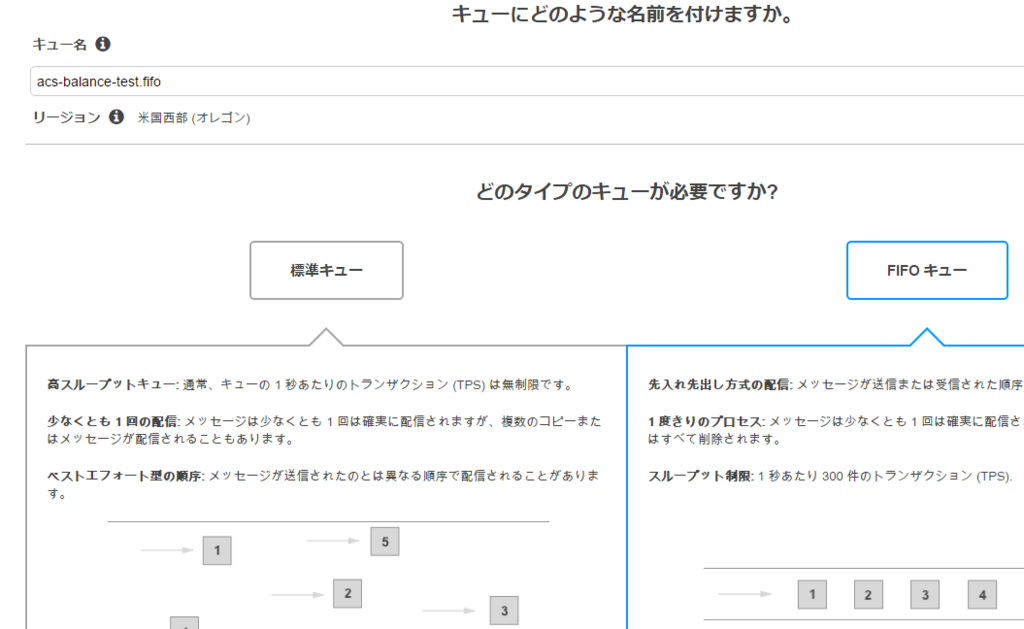
まずはaws上で「オレゴン」リージョンにSQSのキューを作成します。
FIFOキューを選択肢します。
既にcomposerで以下のバージョンのawsのsdkを導入済とします
"aws/aws-sdk-php": "3.26.2"
以下のように送信処理を実装します。
// send.php
$sqs = SqsClient::factory([
    'credentials' => [
      'key' => YOUR_KEY,
      'secret' => YOUR_SECRET_KEY,
    ],
    'region' => 'us-west-2',
    'version' => '2012-11-05',
]);

$time = time();
for($i =0; $i < 10; $i++){
    $sqs->sendMessage([
        'QueueUrl'    => 'https://sqs.us-west-2.amazonaws.com/xxx/xxxxx.fifo',
        'MessageBody' => 'test body'.$i,
        'MessageGroupId' => 'group',
        'MessageDeduplicationId' => hash('sha256', $time.$i),
    ]);
}
受信処理は以下のように実装します。
// recv.php
$sqs = SqsClient::factory([
    'credentials' => [
        'key' => YOUR_KEY,
        'secret' => YOUR_SECRET_KEY,
    ],
    'region' => 'us-west-2',
    'version' => '2012-11-05',
]);
$result = $sqs->receiveMessage([
    'MaxNumberOfMessages' => 10,
    'QueueUrl' =>  'https://sqs.us-west-2.amazonaws.com/xxx/xxxxx.fifo',
]);
foreach ($result->search('Messages[]') as $message) {
    $queueHandle = $message['ReceiptHandle'];
    $messageBody = $message['Body'];
    echo $messageBody."\n";
    $sqs->deleteMessage([
        'QueueUrl' => 'https://sqs.us-west-2.amazonaws.com/xxx/xxxxx.fifo',
        'ReceiptHandle' => $queueHandle,
    ]);
}
実行結果
$ php send.php
$ php recv.php
test body0
test body1
test body2
test body3
test body4
test body5
test body6
test body7
test body8
test body9
ちなみにFIFOでない標準のキューを使用すると以下のようになります
$ php send.php
$ php recv.php
test body0
test body4
test body7
$ php recv.php
test body5
test body8
~略~
次に送信処理を以下のようにMessageDeduplicationIdが重複するように書き換えます
'MessageDeduplicationId' => hash('sha256', $time.$i),
↓
'MessageDeduplicationId' => hash('sha256', $time),
実行結果は以下のように最初の1行のみキューイングされます
$ php send.php
$ php recv.php
test body0
但し永遠に重複idは受付しないわけではなく、300秒間のインターバルで重複メッセージを排除するようです。
FIFO (First-In-First-Out) Queues - Amazon Simple Queue Service
キューの設定に以下のように「コンテンツに基づく重複排除」の選択肢があり、これをチェックすると「sendMessage」で「MessageDeduplicationId」の指定を省略できます。
MessageBodyの内容をsha256して自動で「MessageDeduplicationId」に設定してくれるようです。

「MessageGroupId」は同じグループでの順序性を保証するための値なので適当な文字列を設定するとよさげでした。
PHPのslim3でEloquent\Modelを使用したモデルの実装
illuminate/databaseはEloquentというORM機能も利用できるのでslim3での利用法を記述
以下のようにモデルクラスを作成します。
# src/Sample/Model/User.php
<?php
namespace Sample\Model;
use Illuminate\Database\Eloquent\Model;
class User extends Model {
    protected $table = 'user';
    public function getAttribute($key) {
        return parent::getAttribute(\snake_case($key));
    }
    public function setAttribute($key, $value){
        return parent::setAttribute(\snake_case($key), $value);
    }
}dependencies.phpに「$container->get('db');」の初期化の1行を追加します。
# src/dependencies.php
$container['db'] = function ($c) {
~略~
};
$container->get('db');
コントローラで以下のようにクエリービルダーの形式で記述する事でDBからデータを取得できます
<?php
namespace Sample\Controller;
use Psr\Container\ContainerInterface;
use Sample\Model\User;
class UserController {
    protected $container;
    public function __construct(ContainerInterface $container) {
        $this->container = $container;
    }
    public function index($request, $response, $args) {
        $users = User::all();
        return $this->container['renderer']->render($response, 'user/index.twig', ['users' => $users]);
    }
}
その他Eloquentのモデルの利用法を以下を参照
Eloquent: Getting Started - Laravel - The PHP Framework For Web Artisans
illuminate/databaseを使用したデータベース操作
素で「illuminate/database」を使用したデータベース操作のまとめ
前回の記事で以下のような感じにdbの接続設定を追加したので、それを使用します。
$container['db'] = function ($c) {
    $capsule = new \Illuminate\Database\Capsule\Manager;
    $capsule->addConnection($c['settings']['db']);
    $capsule->setAsGlobal();
    $capsule->bootEloquent();
    return $capsule;
};素のSQLを使用したデータベース操作
# insert
$container['db']->getConnection()->insert('INSERT INTO user (name, created_at, updated_at) VALUES(:name, now(), now())',['name' => 'test1']);

# update
$container['db']->getConnection()->update('UPDATE user SET name = :name, updated_at = now() WHERE id = 3',['name' => 'test10']);

# delete
$container['db']->getConnection()->delete('DELETE FROM user WHERE name = :name',['name' => 'test4']);

# select
$container['db']->getConnection()->select('SELECT * FROM user WHERE id > :id', ['id' => 3]);

# 戻り値が返ってこないようなデータベース操作のSQL
$container['db']->getConnection()->statement('DROP TABLE user');

# トランザクション
$container['db']->getConnection()->beginTransaction();
try {
    $container['db']->getConnection()->insert('INSERT INTO user (name, created_at, updated_at) VALUES(:name, now(), now())',['name' => 'test']);
    $container['db']->getConnection()->commit();
} catch (\Exception $e) {
    $this->container['db']->getConnection()->rollback();
}
クエリビルダーを使用したデータベースの操作
# insert
$this->container['db']->table('user')->insert(['id' => 8, 'name' => 'test8', 'created_at' =>  \Carbon\Carbon::now(), 'updated_at' =>  \Carbon\Carbon::now()]);

# update
$this->container['db']->table('user')->where('id', '=', 2)->update(['name' => 'test12']);

# delete
$this->container['db']->table('user')->where('id', '=', 7)->delete();

# select
$users = $this->container['db']->table('user')->where('id', '>', 1)->get();
その他、クエリービルダーの記述法
PHPのslim3でデータベースに接続する
今回はデータベースに接続する設定を追加します。
DBに接続するライブラリは以下を使います。
composer.jsonに以下の設定を追加してcomposer updateします。
composer.json
@@ -15,6 +15,7 @@
         "php": ">=5.5.0",
         "slim/slim": "^3.1",
         "slim/twig-view": "2.2.0",
+ "illuminate/database": "v5.4.13",MySQLに接続する環境はできてるとしてMySQLに以下のコマンドでテーブルを追加します
CREATE DATABASE sample default character set utf8;
GRANT ALL ON sample.* TO sample@'%' IDENTIFIED BY 'password';
CREATE TABLE `user` (
      `id` int(11) NOT NULL AUTO_INCREMENT COMMENT 'ユーザID',
      `name` varchar(256) NOT NULL COMMENT 'ユーザ名',
      `created_at` datetime NOT NULL COMMENT '登録日',
      `updated_at` datetime NOT NULL COMMENT '更新日',
      PRIMARY KEY (`id`)
);
INSERT INTO user VALUES (1,'test_user',now(),now());settings.phpにMySQL用の接続設定を追加します
src/settings.php
     'settings' => [
         'displayErrorDetails' => true, // set to false in production
         'addContentLengthHeader' => false, // Allow the web server to send the content-length header
+        'determineRouteBeforeAppMiddleware' => false,
+        'displayErrorDetails' => true,
+
+        'db' => [
+            'driver' => 'mysql',
+            'host' => 'mysql-server',
+            'database' => 'sample',
+            'username' => 'sample',
+            'password' => 'password',
+            'charset'   => 'utf8',
+            'collation' => 'utf8_unicode_ci',
+            'prefix'    => '',
+ ],dependencies.phpにdb用のコンテナ設定を追加します
src/dependencies.php
@@ -3,6 +3,16 @@

 $container = $app->getContainer();

+$container['db'] = function ($c) {
+    $capsule = new \Illuminate\Database\Capsule\Manager;
+    $capsule->addConnection($c['settings']['db']);
+    $capsule->setAsGlobal();
+    $capsule->bootEloquent();
+    return $capsule;
+};
最後にコントローラに以下のようにDBにアクセスするコードを記述します。
src/Sample/Controller/TopController.php
@@ -15,6 +15,7 @@ class TopController
     public function index($request, $response, $args)    {
+        $user = $this->container['db']->table('user')->find(1);
+        return $this->container['renderer']->render($response, 'top/index.twig', ['message' => 'Hello '.$user->name]);
     }
 }
これでアクセスするとDBの内容が表示されるようになります
